Chapter 1 · Getting started · Lesson 9 · 3 min
Smart Flow
See where the wallets you follow are putting money right now, one card per event.
Smart Flow in the Pro header shows where the wallets you follow are putting their money right now: one card per event, with the side they're piling into and the price they paid.
What you see
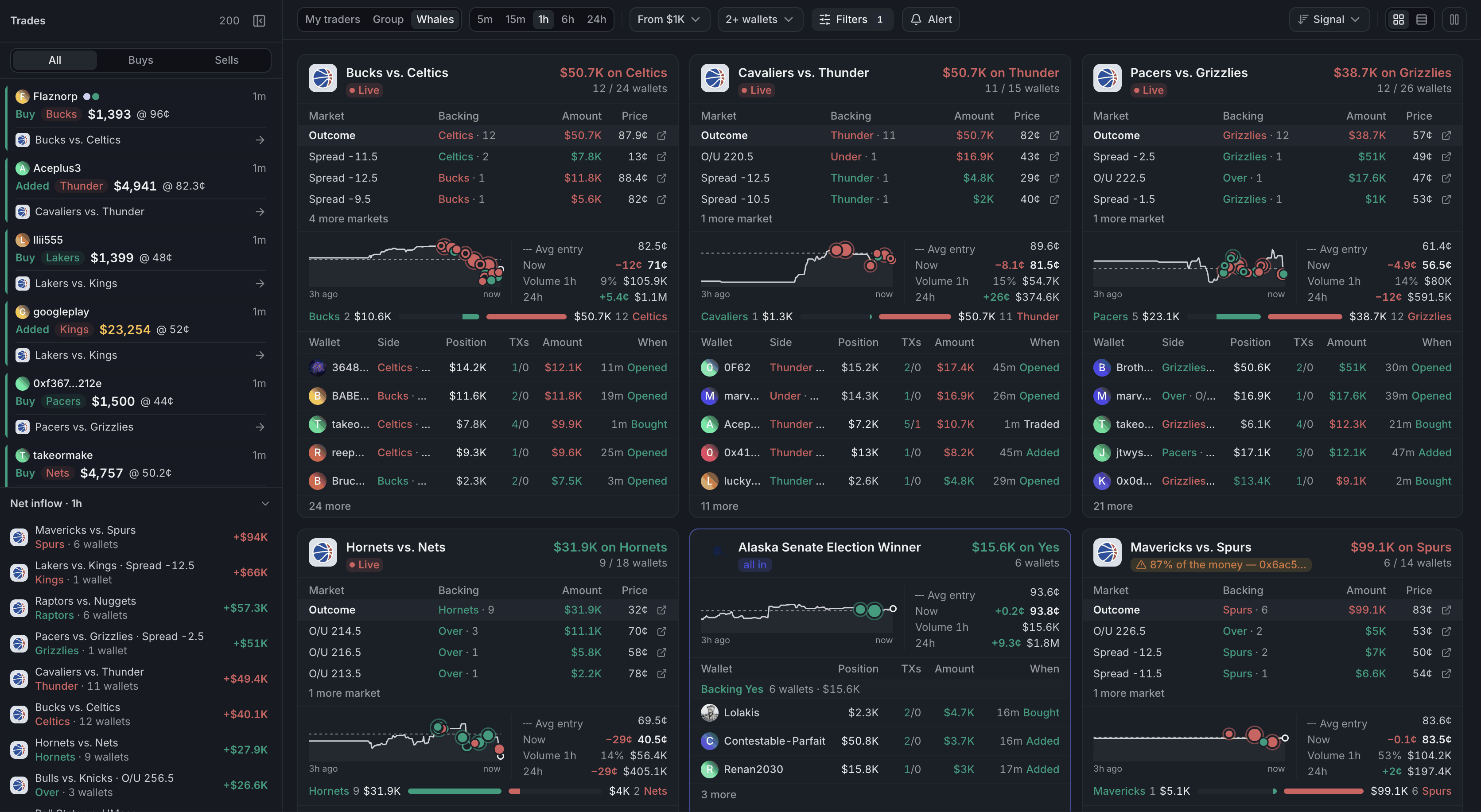
- 1Whose trades count
- 2The window
- 3Every trade of the window
- 4Markets with the most net money
- 5One card per event
At the top, pick whose trades count: My traders (every wallet you've marked), Group (one tag or folder) or Whales (large trades from everyone). Next to it, pick the window, from 5 minutes to 24 hours.
A card's header says which side leads and how much is behind it, like "$8.7K on Thunder". all in means every wallet backs that side. A yellow chip warns when one wallet carries most of the money: a single bet, not a crowd.
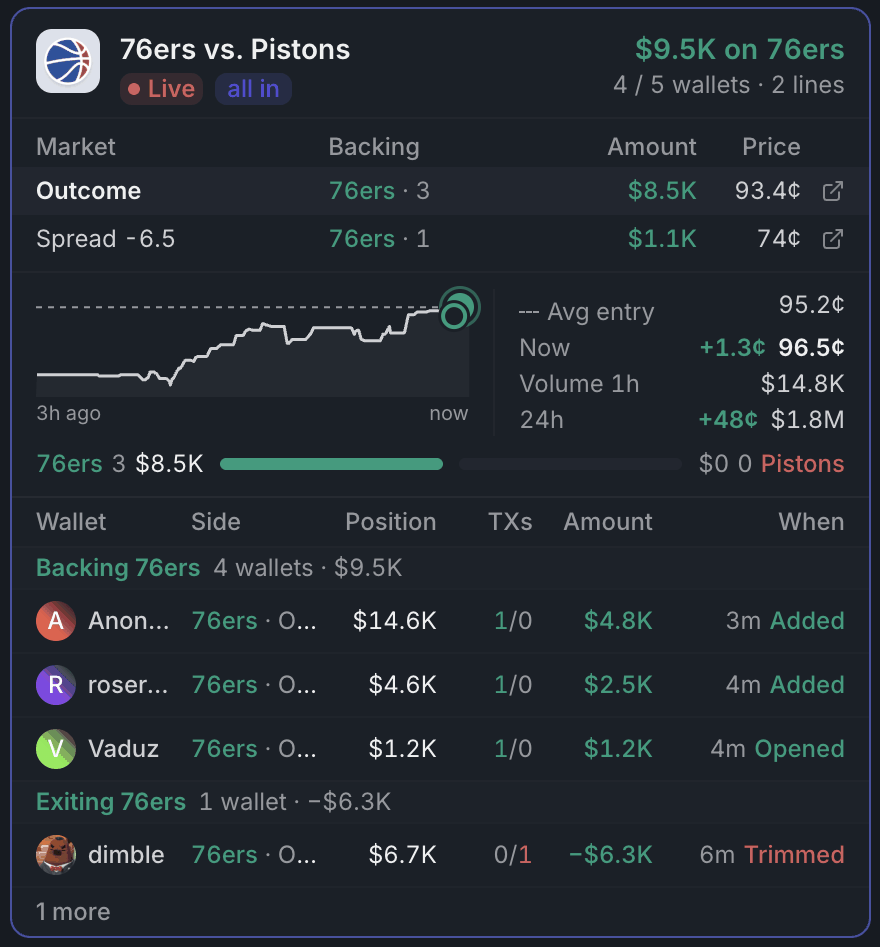
- 1Leading side and its money
- 2Their average entry
- 3Entry against the price now
- 4Wallets cashing out
- 5What each wallet holds now
- The chart is the leading side's price with every trade on it: bigger dots are more money, filled is a buy, hollow a sale. The dashed line is their average entry.
- Avg entry next to Now tells you whether you can still get in near their price.
- Wallets sit under Backing … or Exiting …. Only buying backs a side: a wallet that sells is cashing out.
- Position is what the wallet holds now, and When what it did: Opened, Added, Trimmed or Closed.
A match with several lines (moneyline, spread, totals) gets one card. Click a line to chart it.
Using it
Narrow it down
Trade size drops small trades, and Min wallets hides markets where too few wallets agree. Filters hides decided markets (95¢ and up, or 5¢ and down) and whole categories. Sort ranks by Signal (how many wallets agree), Inflow (most money) or Recent.
Keep the list still
Cards re-sort as trades land, but not while your pointer is over them: new markets wait in a pill at the top. Pause holds the order until you resume.
Trades and net inflow
The Trades panel on the left lists every trade of the window. Hover one to light up its card, or click a wallet's name to show only that wallet. Net inflow under it ranks markets by net money; click one to jump to its card.
Trade from it
Click a card to open its market in a window over the page. In Table view, each row has a Buy button for the leading side: set an Amount in the toolbar and Buy opens the market with that market buy in the betslip. Nothing is sent until you place it.
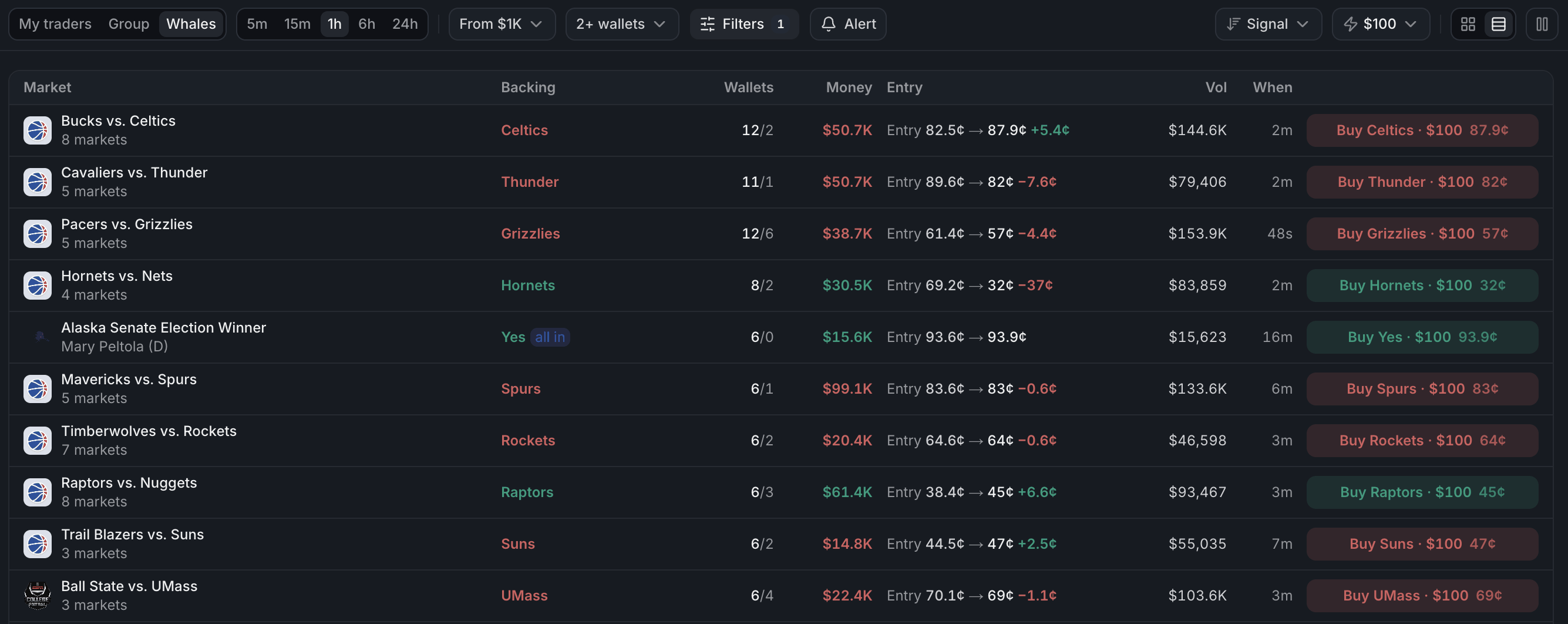
- 1What Buy puts in the betslip
- 2Their entry against the price now
- 3Opens the market with that buy
Tips
- Start with Group on a short folder of wallets you trust and a 1h window. Switch to 24h to see what built up overnight.
- Min wallets at 3+ with Signal skips lone bets and surfaces real agreement.
- Read Exiting too: smart money leaving a side tells you as much as money coming in.
- Hover a wallet's name for its record and your notes before you follow it.
Finish reading to complete this lesson
Extras
When history is short
Smart Flow counts the trades it could load. If the window reaches further back than that, a line under the toolbar says how far the history goes. Following more than 500 wallets turns live trades off: the page shows history only, with a Refresh button to load new trades.
Settings
| Setting | What it does |
|---|---|
| Trade size | The smallest trade that counts: any trade or $100 to $5K for your traders, $1K to $50K for Whales |
| Min wallets | Hides markets with fewer wallets backing one side |
| Filters | Hide decided markets, and hide Sports, Esports, Crypto, Weather or Socials |
| Sort | Signal, Inflow or Recent |
| Amount | What Buy puts in the betslip in Table view. It fills in when the betslip's Buy input is in dollars; No amount opens the market empty |
| Cards / Table | Cards show each event in full; Table fits many markets on one screen |