Chapter 3 · Trading · Lesson 5 · 3 min
Positions
Every position you hold, marked live, with one-click exits, merges and redemptions.
Positions lists everything you hold, priced live: what your book is worth and what you'd get out of it right now. It covers your whole account and needs no market, but in a colour group it can narrow down to that colour's market.
What you see
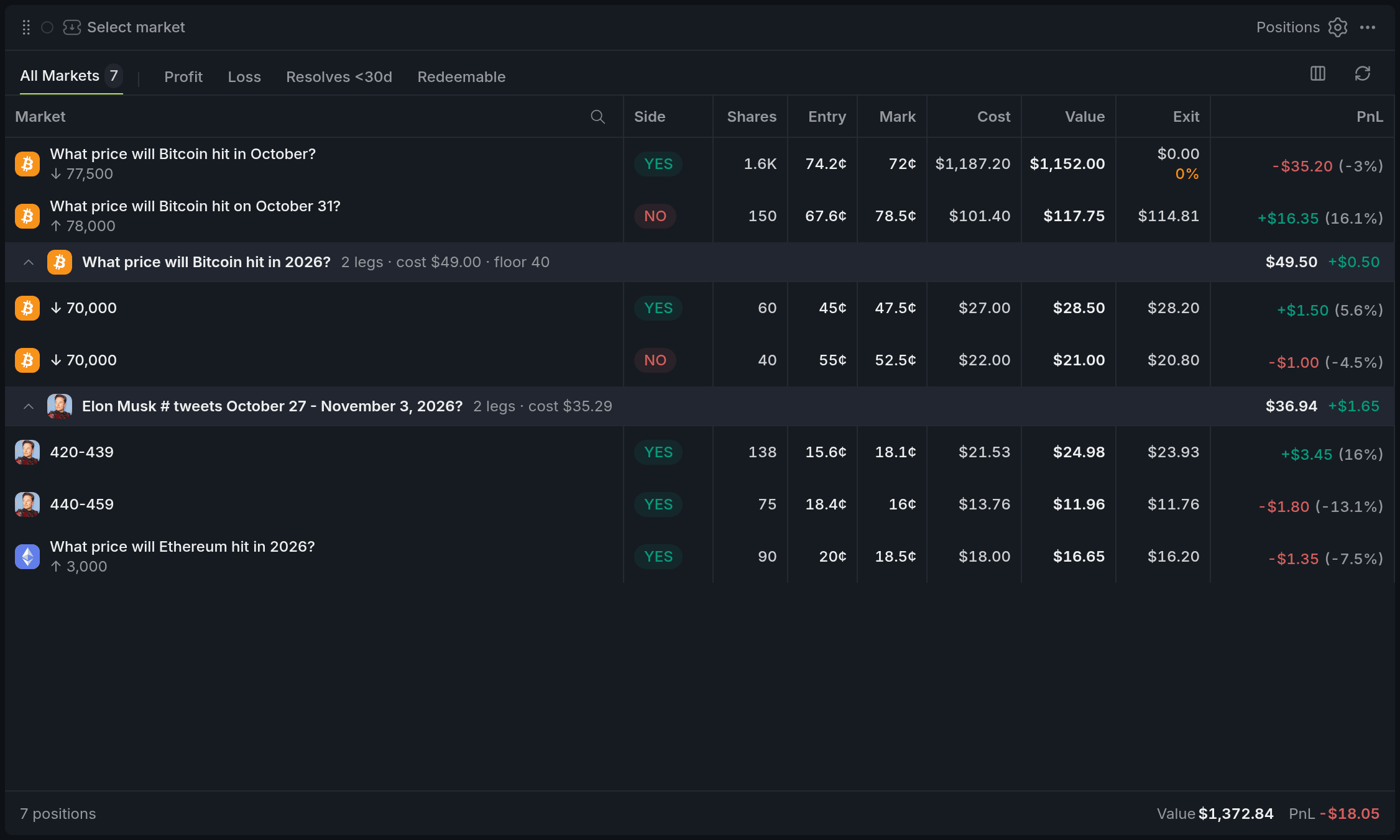
- 1All Markets tab with the count
- 2Filter chips
- 3Mark: the live price
- 4Exit with a warning percentage
- 5Totals bar
Mark is the live price each row is valued at: the midpoint of the best bid and ask when the spread is 10¢ or less, otherwise the last trade. Value is shares times mark, and PnL is value minus what you paid.
Exit is what you'd get selling the whole position into the bids now. If the book can't take it all, a warning percentage shows how much it can; hover for the average sale price.
Rows are grouped by event, and the totals bar adds up the value and PnL of what's on screen.
Using it
Opening a market
Click a row and every widget in its colour switches to that market and side, so the Chart, Orderbook and Betslip all show it at once.
Selling
Hover a row for its actions:
- Sell brings the market to the Betslip in the same colour, with the whole position in Sell at market.
- Limit, shown with the best ask (like Limit 54¢), does the same with a limit sell at that price.
Neither sends anything by itself: you check the order in the Betslip and press Sell there.
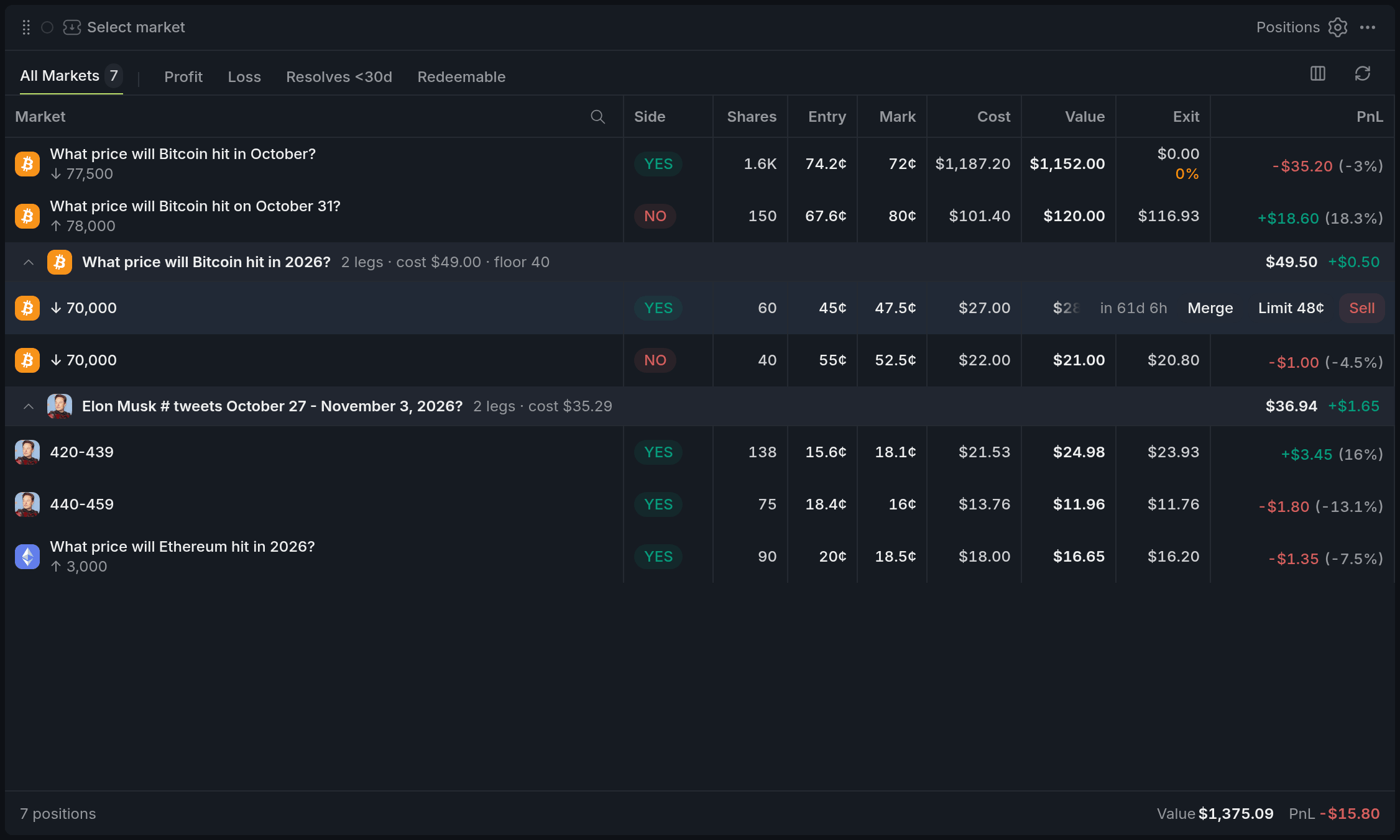
- 1Sell: whole position to the Betslip
- 2Limit at the best ask
- 3Merge Yes + No into cash
Merge, Redeem and Close
Hold both Yes and No on the same market? MergeMergeTurning one Yes share and one No share of the same market back into $1 of cash, without trading in the book. turns each Yes + No pair back into $1 of cash, without selling into the book. Once a market resolves, a winning row gets RedeemRedeemCollecting the payout of a resolved market: each winning share pays $1., which pays $1 per share, and a losing one gets Close, which clears it from the list. All three ask you to confirm first.
With other widgets
- If Positions has no colour yet, Sell moves it into Purple.
- The Chart draws the same position as a line at your average price, where you can set exits.
Tips
- Keep a Betslip in the same colour as Positions. Getting out is then hover, Sell, a glance at the ticket, and send.
- Before you sell a big position, glance at Exit. A warning percentage means the bids can't take it all at once; sell in parts or use a limit at the ask.
- Each morning, turn on the Redeemable chip and clear out resolved markets in one pass.
Finish reading to complete this lesson
Extras
Finding what you need
The tabs switch between All Markets and, in a colour, that colour's Event or Market. Chips filter by Profit, Loss, Resolves <30d and Redeemable, search matches any name a row shows, and column headers sort.
Columns
Market, Side and PnL always show. The rest can be hidden and reordered from the columns button or the settings.
| Column | What it shows |
|---|---|
| Shares | How many shares you hold. |
| Entry | Your average price. |
| Mark | The live price the row is valued at. |
| Spread | The gap between the best bid and ask. Hidden by default. |
| Cost | What you paid in total. |
| Value | Shares times mark. |
| Exit | Proceeds of selling it all into the bids now. |
| Weight | The row's share of the value on screen. Hidden by default. |
| Price Δ | How far the mark has moved from your entry. Hidden by default. |
A group header can also show "floor": the Yes + No pairs in that event, each worth a guaranteed $1 when merged.
Settings
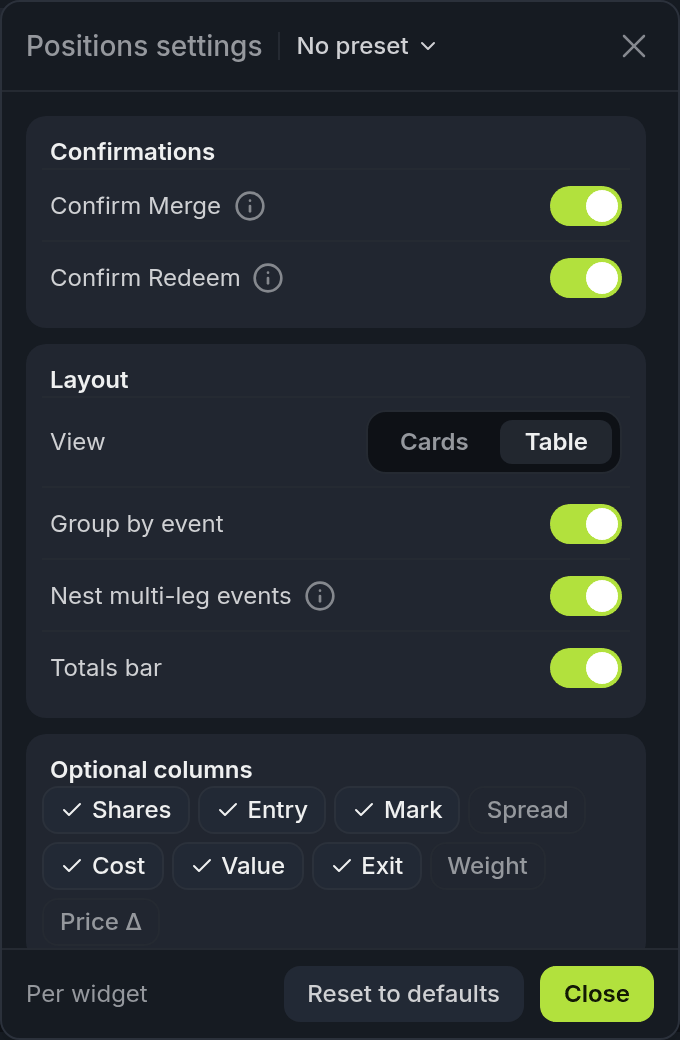
- 1Confirmations: Merge and Redeem
- 2View: Cards or Table
- 3Optional columns
| Setting | What it does |
|---|---|
| Confirmations | Confirm Merge, and Confirm Redeem (also used for Close). Both on by default. |
| View | Table or Cards. A narrow widget switches to cards on its own. |
| Group by event, Nest multi-leg events | Group rows under their event, and indent the legs of events with two or more outcomes. |
| Totals bar | The sums at the bottom. |
| Optional columns | Which columns show. Drag a chip to change their order. |
| On hover | Which hover actions show (Sell, Limit sell at the ask, Merge YES + NO), Exit details, and the time left to resolution. |