Chapter 4 · Analysis · Lesson 9 · 2 min
Notes
A trading journal inside Pro. Notes attach to the market you're on, with its price, and sync to your account.
Notes is a trading journal that lives on your board. A note written here remembers the market and the price you saw, so you can check later how the idea played out.
What you see
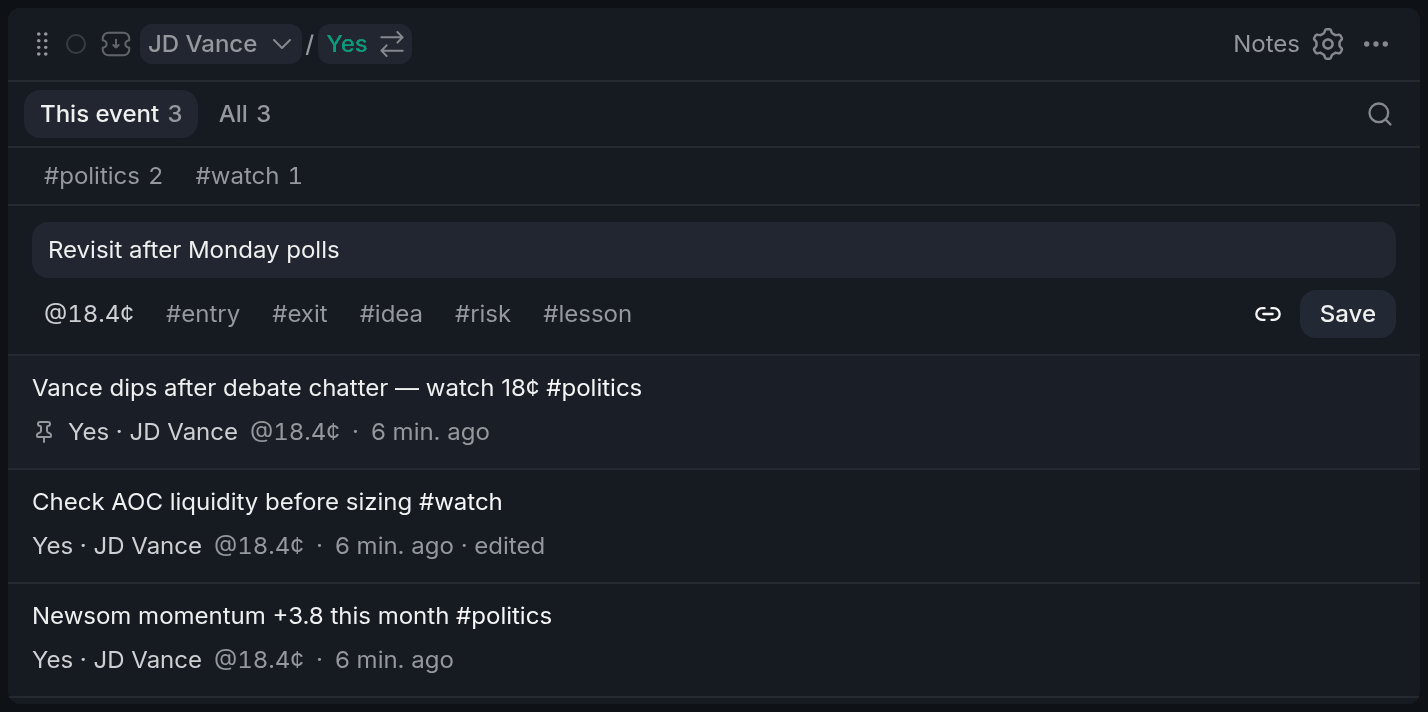
- 1This event / All
- 2Write box: link, price, quick tags
- 3Tag row
- 4Market and price at writing
- 5Pinned note
This event shows the notes on the event the widget's colour is on, and All shows every note you've written. Under each note sit its market, the price when you wrote it and, when that market is on screen, how far it has moved since. Pinned notes stay on top.
Using it
Write a note
Type in the box and press Ctrl+Enter (⌘+Enter on a Mac) or Save. A new note attaches to the outcome the widget is on, with its live price; click the link icon to write a general note instead. The price button drops the live price into the text, and the quick tags below add #entry, #exit, #idea and the like.
Find it again
Search, or click a tag in the tag row to show only those notes. Click a note's market to switch its colour back to that market. Double-click a note to edit it.
Notes in other widgets
Once a market has notes, any widget showing it gets a small notes count in its header. Click it to read the latest ones or add a quick note without a Notes widget on the board.
With other widgets
- Notes follows its colour's market, and clicking a note's market sets it.
Tips
- Tag every trade with
#entryor#exitand a line on why. Filtering by tag later shows which reasons actually paid. - Write the price you'd change your mind at. The price-at-writing move tells you when to look at the note again.
Finish reading to complete this lesson
Extras
Your notes are saved to your account
Every Notes widget shares the same notes, and they sync to your account; signed out, they stay in this browser. You can keep up to 1,000 notes, and settings can export them all as CSV or Markdown.
Settings
| Setting | What it does |
|---|---|
| Order | Last edited or Newest. Pinned notes stay on top either way. |
| Price at writing | Shows the price when the note was written, and its move since. |
| Fold long notes | Long notes show five lines until opened. |
| Attach to market | New notes go on the widget's outcome with its price. Off: every note starts as a general one. |
| Price button | The button that inserts the live price. |
| Quick tags | Up to 8 one-click tags under the text box. |