Chapter 4 · Analysis · Lesson 8 · 3 min
Alerts
Your alerts as a live tape, with one-click buys on the trades you follow and your alert rules at hand.
Alerts puts your alert feed inside Pro as a live tape: trades from wallets you track, price moves, new markets, and your own fills. Spot a trade you like and follow it in one click.
What you see
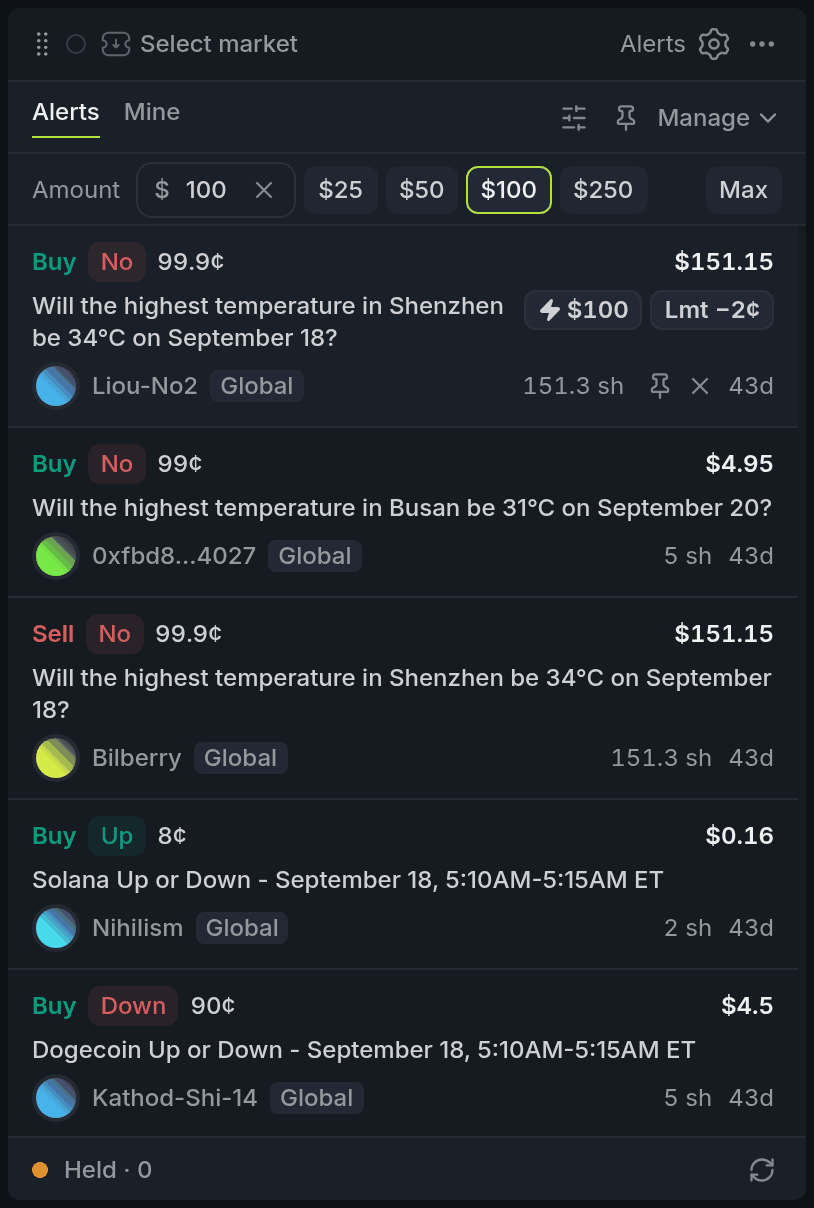
- 1Alerts / Mine tabs
- 2Amount row
- 3⚡ and Lmt on the hovered row
- 4Held: the tape is paused
Alerts holds what you track: trades, moves, new and resolved markets. Mine holds what happened to you: fills, cash-outs and balance changes. Linked appears when the widget's colour has a market, and shows only that market's alerts.
A stripe on the left marks unread alerts; alerts on the colour's market get a stripe in that colour instead. Runs of alerts on one event group under a header you can fold.
While your pointer is over the list or you've scrolled down, the tape holds still (Held in the footer). +N new at the top brings in what's waiting.
Using it
Open a market
Click an alert and its colour switches to that market and outcome. Click the trader's name to open their trader window. Hover a row for a filter button next to the market and the trader: Only this market or Only this trader keeps just those alerts. With the widget focused, j and k walk the list and Enter opens the alert.
Fast buy
Fast buy starts switched off: turn it on in the Fast buy tab of settings. Then hover a trade, move or fill to buy the same outcome for the amount in the Amount row. ⚡ places a GTCGTCGood 'til cancelled: a limit order that stays in the book until it fills or you cancel it. limit orderLimit orderAn order to buy or sell at your price or better. Whatever doesn't fill right away waits in the book. at the current best askAskA resting order to sell. The best ask is the lowest price any seller will accept right now., so it fills right away as far as the ask has size. Lmt −2¢ rests 2¢ below the ask and waits. Fast buy only buys; press 1 to fast-buy the focused alert with ⚡.
There's no betslip in between: a click sends the order. Only amounts of $500 or more ask for a second click by default, so set Confirm from lower in settings if you want every buy confirmed.
Manage your alerts
Manage lists your alert rules by Traders, Markets and Global, and Add creates one for a wallet, a market, trades anywhere or new markets. Each rule sets its trigger, delivery (App or TG) and expiry. A wallet too noisy? Mute it for 15m, 1h or 8h instead of untracking it. You can also set alerts from the trader window, the Traders widget and right on the Chart.
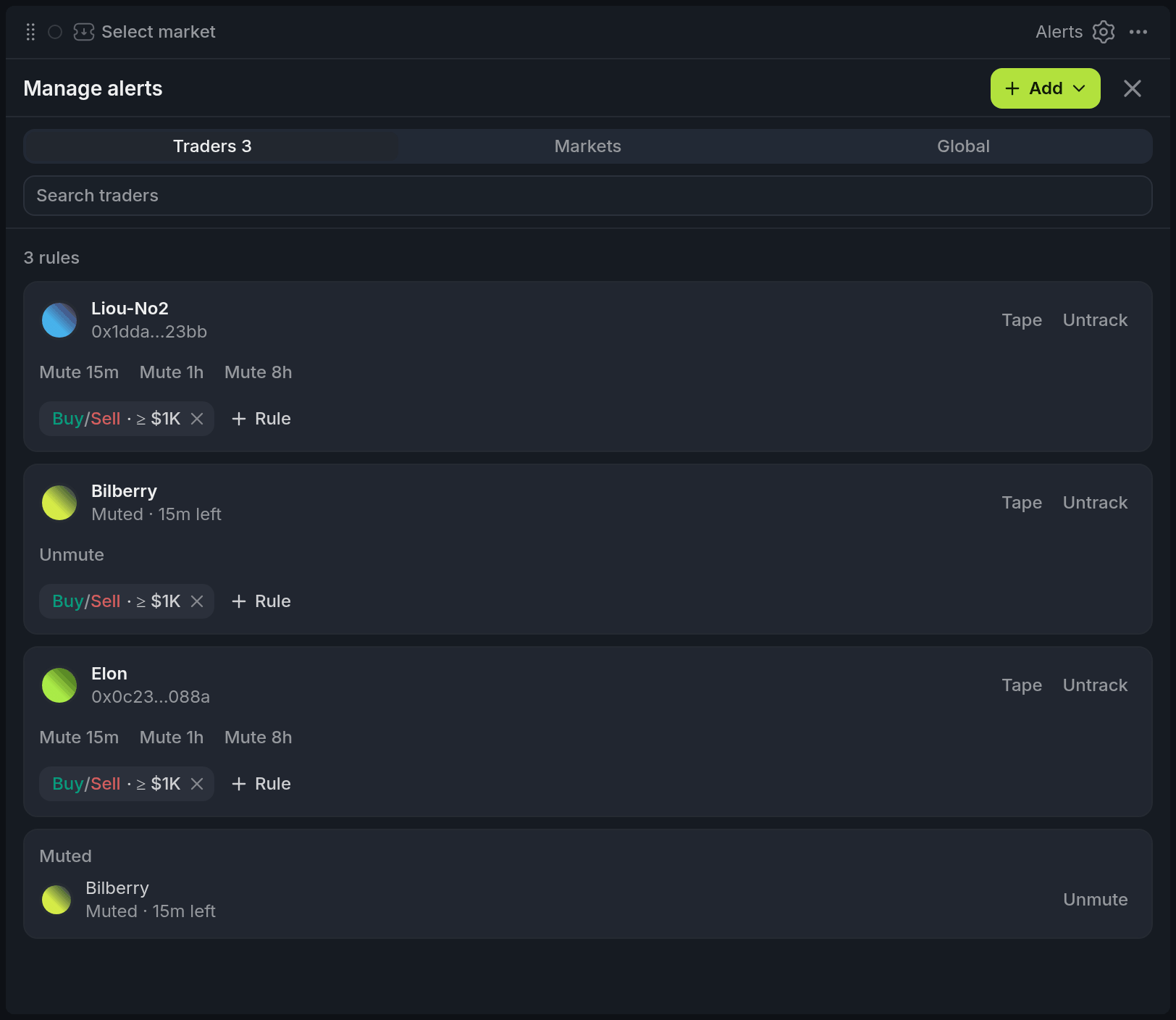
- 1Traders / Markets / Global
- 2Add
- 3Mute 15m / 1h / 8h
- 4Muted, with time left
With other widgets
- An alert you click switches its colour, so a Chart, Orderbook or Betslip there follows. Linked, in turn, follows whatever market the colour is on.
Tips
- On thin books, use Lmt instead of ⚡. Following a whale at the ask can mean paying the top of their move.
- Keep a second Alerts widget on Mine next to Positions, so fills and cash-outs land right where you track your P&L.
Finish reading to complete this lesson
Extras
Filters, pins and dismissing
The filter button narrows the tape by search, Type, Action (Buy or Sell), Groups (the tags and folders of the trader behind each alert) and Min $, with $100, $1K and $10K presets, and the pin button shows only pinned alerts. Hover an alert to pin it or dismiss it; dismissing removes it from your alerts. With the widget focused, f pins and x dismisses.
Settings
| Tab | What it covers |
|---|---|
| Feed | Which kinds of alert reach the tape at all, and Min trade, a dollar floor for trades, fills, positions and cash-outs. |
| Tape | Flash new rows, Pause on hover, Group bursts, Maker / Taker (M or T after a trade) and Time (Ago or Clock). |
| Fast buy | Turn it on (it's off by default), which buttons show (Both, Market or Limit), Confirm from (Off, $100, $500, $1k) and Limit offset. |
| Sound | A sound on new alerts: for Trades, Moves & markets or Mine, from a dollar amount, with volume and a choice of sounds. |